Local deliveries · Time planning
Plan the time behind each delivery
A route needs more than driving time. Use this delivery route calculator to include time at stops before you accept a schedule.
aibot.delivery provides practical delivery guidance and a free calculator. Enter your own estimates to compare a route with your available time.
Delivery route time calculator
Include travel from your starting point, between stops, and to your finish point. Count each delivery location as a stop.
Service time covers parking, walking, unloading, and the handoff. Put breaks and extra time for uncertainty in the buffer field.
Use whole numbers. Time fields accept 0–1,440 minutes. The stop field accepts 0–1,000 stops. These are calculator limits.
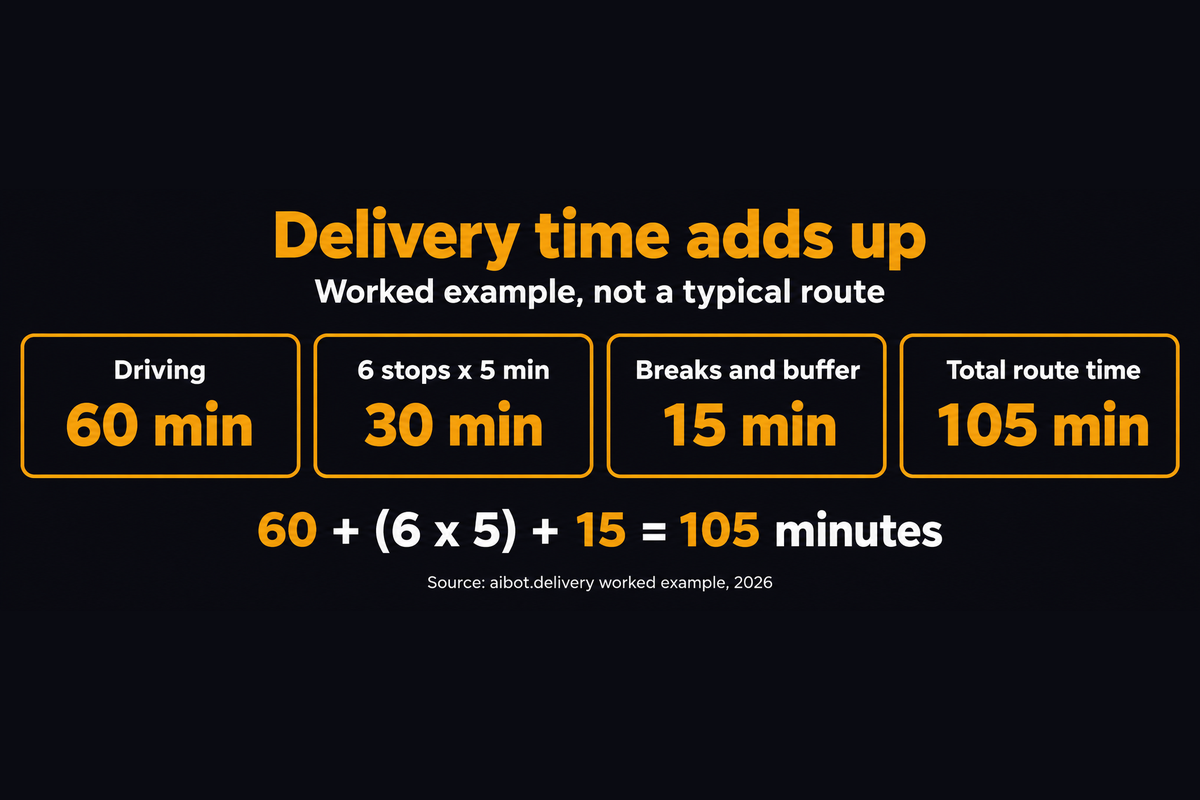
Method: Total minutes = driving minutes + (stops × minutes per stop) + breaks and buffer. Remaining minutes = available minutes − total minutes.
The default values form an example, not a recommended pace. This calculator runs in your browser without sending your inputs to a server.
It does not choose a route, check traffic, track parcels, or quote shipping prices. A positive result shows spare estimated time, not guaranteed capacity.
Build a useful estimate before departure
Start with your actual delivery list. Check the street address, apartment or suite, recipient instructions, and any agreed delivery window.
Separate a promised arrival window from a preferred arrival time. Mark deliveries that require a signature or a named recipient.
- Choose a provisional stop order in your usual mapping tool.
- Copy the total driving estimate into this calculator.
- Add time for parking, building access, and each handoff.
- Include breaks and a buffer for delays.
- Compare the result with the time you actually have.
Use notes from your own completed routes to estimate service time. For mixed routes, add the expected minutes for all stops first.
Divide that sum by the stop count to estimate an average. Round that average upward to a whole minute for this calculator.
A large unloading job and a small doorstep parcel need separate attention. The average is only a planning shortcut.
Use the result to change the plan
If the calculator shows an overrun, review the schedule before departure. Consider moving a flexible stop or arranging another delivery slot.
Do not treat a lower buffer as proof that a difficult route will fit. Change an input only when the change reflects your plan.
Check each promised window separately. A route can fit the overall time budget while still reaching an early appointment too late.
For the illustrated route, 120 available minutes leave 15 minutes after the 105-minute estimate. With 90 available minutes, the same route overruns by 15 minutes.
Both results use the same driving and service assumptions. Neither result accounts for live traffic, road closures, or unexpected access problems.
Read package updates with care
A package status and a route estimate answer different questions. Use the carrier's own tracking page for the parcel's latest recorded status.
USPS explains that an insufficient address can cause a return to the sender. USPS also lists locked buildings as a cause of failed access.
Check those details with the recipient before a local delivery. Keep a record of the instructions that apply to the actual address.
Source: USPS, “Where is my package? Tracking Status Help,” checked in 2026. This source explains tracking events and delivery access problems.
Check unexpected delivery messages
An unexpected delivery text can impersonate a carrier. The Federal Trade Commission describes scams that request card details for an undelivered package.
Open a known carrier website independently. Do not use a link or phone number from an unexpected message to check the parcel.
Source: Federal Trade Commission, “Don't click on that random text. It's a scam” (2022). Its advice supports this separate verification step.